Console
Automated Report & Billing
Redesigning the report and billing workflow to match the real-world edge cases that both the CS and Accounting teams face every month.

Overview
My Role
Explored multiple problem-solving approaches for the operations team
Created user flows for end-to-end billing scenarios
Documented and categorized all cases handled by CS and Accounting
Timeline
May - Jun 2025
Team
Vasutorn K.
Rawisara L.
Product Associate
UX/UI Associate (Me)
Tools
Figma, Figjam, Claude
The Problem
Finance staff currently build invoices, write billing emails, and reconcile receipts entirely outside Salary Hero which is a slow, error-prone process that doesn't scale. This feature automates the complete billing cycle: report dispatch, invoice generation via FlowAccount, outbound email, and receipt reconciliation, all within the Report & Billing page. Finance teams can now close billing cycles faster, with no manual data re-entry.
Empathize
User Journey

The blue frame in the journey map above shows the current state, where both CS and Accounting still manually prepare and send each client's report and invoice. Client-specific requirements have made full automation difficult.
Why we built
These are the core problems driving the manual workload for CS and Accounting. By addressing them, we aim to reduce repetitive effort and build a process that scales as we bring on more client companies.
📝
Different Formats
Each client uses a different payroll provider, resulting in inconsistent file formats.
💰
Client-Requested Adjustments
Clients sometimes want to pay a specific amount that differs from the system total, requiring CS to update the report and Accounting to adjust the invoice.
🏢
Child Company Grouping
Some pay cycles must be bundled into a single email because a child company shares the same HR contact as its parent.
Define & Ideate
Concept Ideate
The feature will be split into two parts:
Create Workflow/Task (Configuration) - Define how billing runs for a set of companies: which companies and pay cycles map to which report and invoice templates, and who receives the emails. Workflows are reusable.
Workflow Transaction (Runtime) - Once a workflow is set to Active, the system automatically generates one transaction per billing period and moves it through a defined status lifecycle.
Ideation #1 — Fully Configurable
CS and Accounting can configure every variable and save templates for future reuse.
User Flow

Prototype

👍
Pros
Full flexibility; no manual adjustments needed outside the console. Everything lives in one place.
👎
Cons
Heavy on dev resources. In practice, most enterprise clients share the same payroll format, so the level of configurability exceeds current needs.
🗣️
User's Feedback
CS and Accounting can't set up their steps independently. The Accounting team has to wait for the report before starting.
"Save template" is unnecessary since the setup only happens once anyway.
Ideation #2 — Simplified Configuration
We trimmed the setup process by removing unnecessary complexity. Templates are pre-loaded by the backend, so CS and Accounting can configure workflows with fewer steps — and developers have less to build.
User Flow

Prototype
👍
Pros
Faster and easier workflow setup; backend handles template management.
👎
Cons
A small number of reports still require manual sending due to current console limitations
🗣️
User's Feedback
Noticeably easier for both teams to set up.
Report and billing can now be configured independently, which speeds up the overall process.
Results
Create Workflow (Configuration)

Entry point: Report & Billing → Workflow Setting tab (Image 1). Shows a table of workflows (Workflow ID, Name, Status, Last Active, Report Template, Invoice Template, Create/Update at) with a + Create Workflow button. A workflow can be saved as Draft and later becomes Active.
Every workflow requires a Workflow Name (mandatory) and is split into two tabs: Report and Billing.
1.1 Report tab

Step 1 — Select Company
Select one or more companies. Each company has a Pay Cycle selector (or "All").
A company may tick "Include child company", which adds the child company plus its own Child Company's Pay Cycle.
+ Add Company adds more company rows.

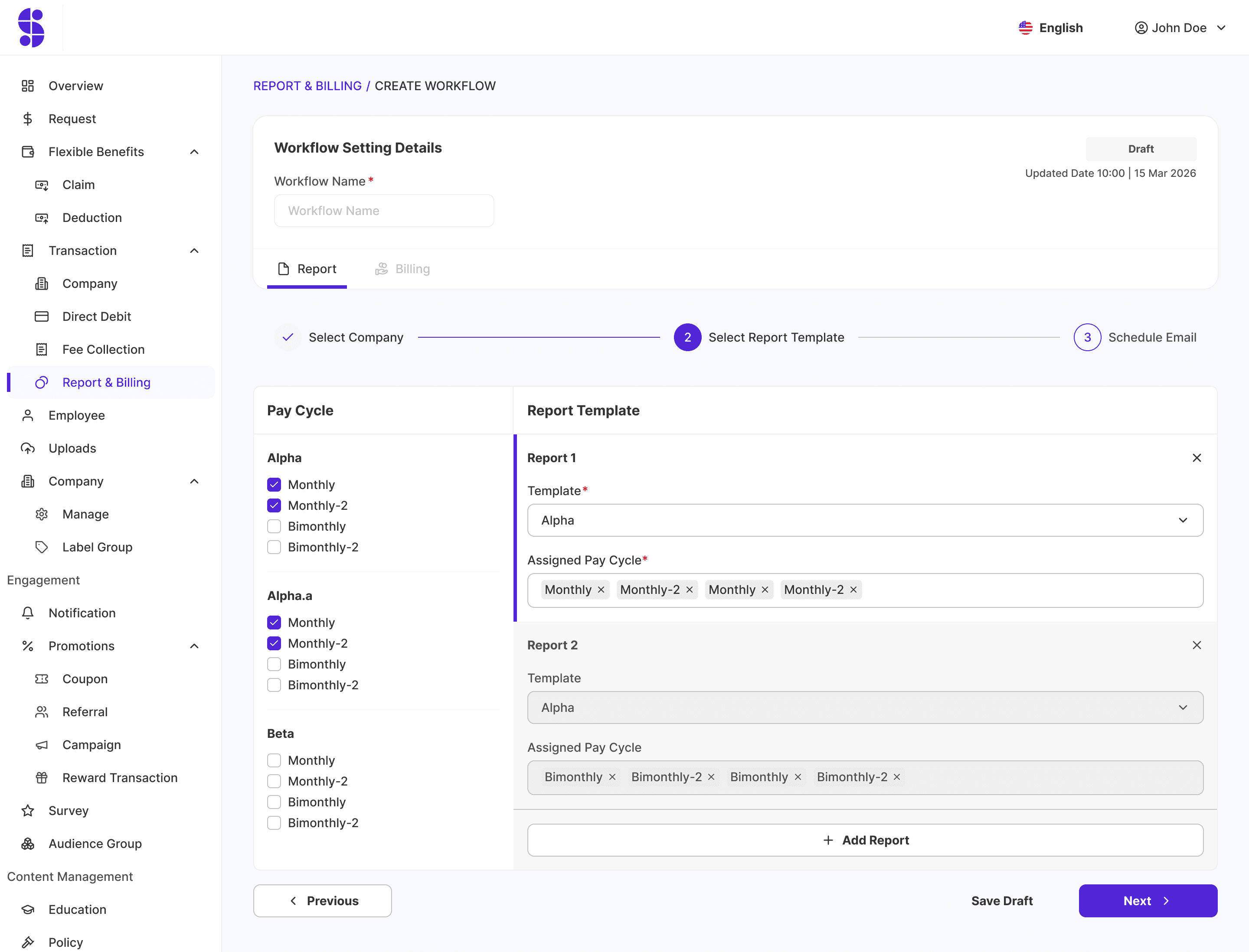
Step 2 — Select Report Template
Left panel lists each company / child company with its available pay-cycles (Monthly, Monthly-2, Bimonthly, Bimonthly-2) as checkboxes.
Right panel = one or more Reports. Each Report = a Report Template + an Assigned Pay Cycle set.
This step groups pay-cycles into report templates. + Add Report allows more than one report.

Step 3 — Schedule Email
Per-report email recipient configuration: Template + Assigned Report + To / Cc / Bcc lists.
Supports Upload / Download of the email recipient list.
+ Add Email allows multiple emails per report.
⚠️ "Schedule Email" configures recipients only — it does NOT set a send date/time. The actual send time is computed automatically by the system (see §3.2).
1.2 Billing tab

Step 1 — Select Invoice Template
Same grouping concept: group pay-cycles into one or more Invoices. Each Invoice = Invoice Template + Assigned Report + Company Address.
Each invoice may tick "Add SaaS Fee Invoice" to additionally produce a SaaS-fee invoice.
+ Add Invoice allows more than one invoice.

Step 2 — Sending Email
Per-invoice email recipient configuration: Template + Assigned Invoice + To / Cc / Bcc, with Upload / Download and + Add Email.
1.3 Configuration constraints
Cannot mix a monthly-type pay-cycle and a bimonthly-type pay-cycle in the same report group or the same invoice group. (i.e. Monthly / Monthly-2 must not be grouped together with Bimonthly / Bimonthly-2.)
Cutoff Slot and Workflow start date are global settings, not set inside Create Workflow.
Workflow Transaction (Runtime)

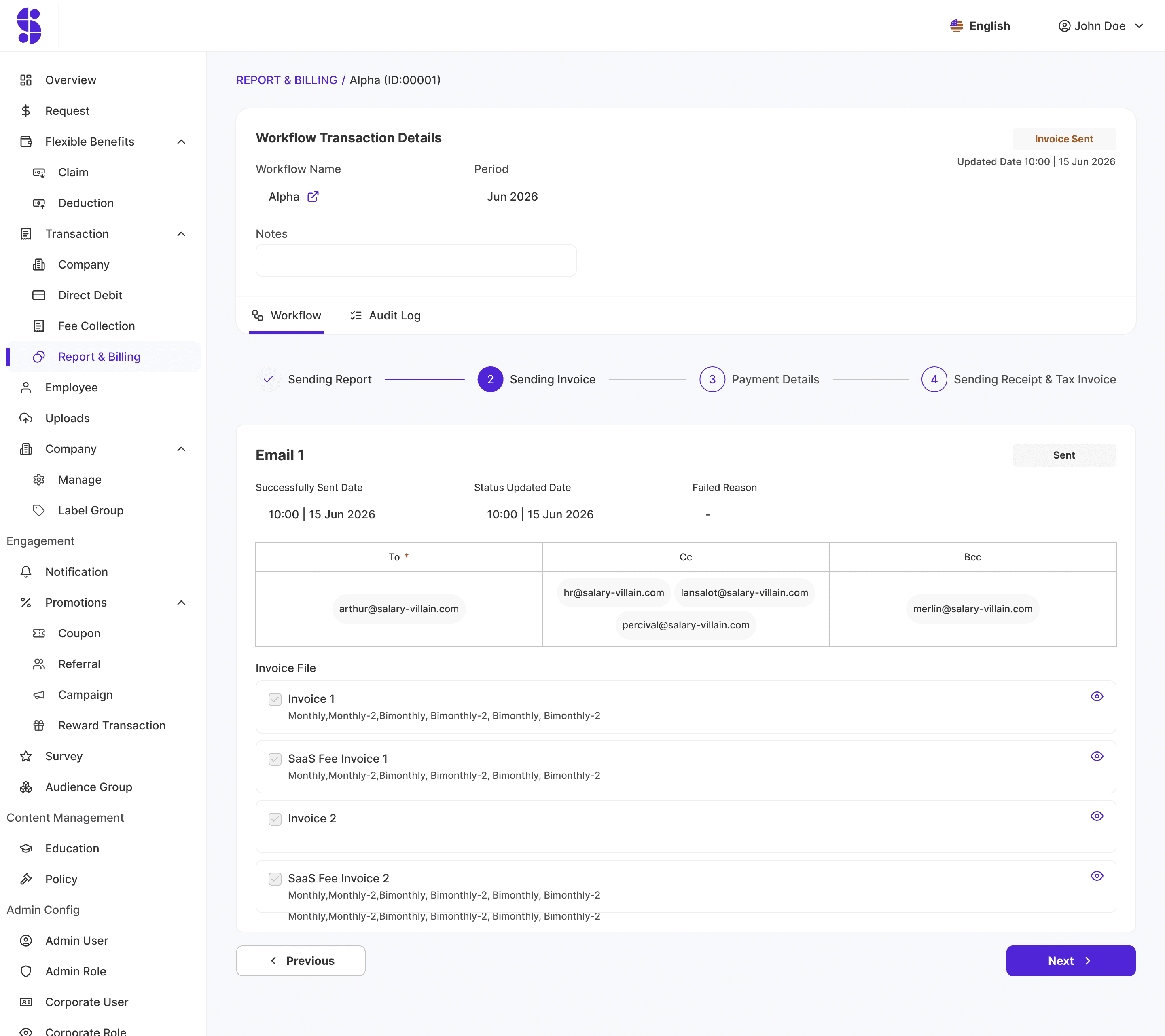
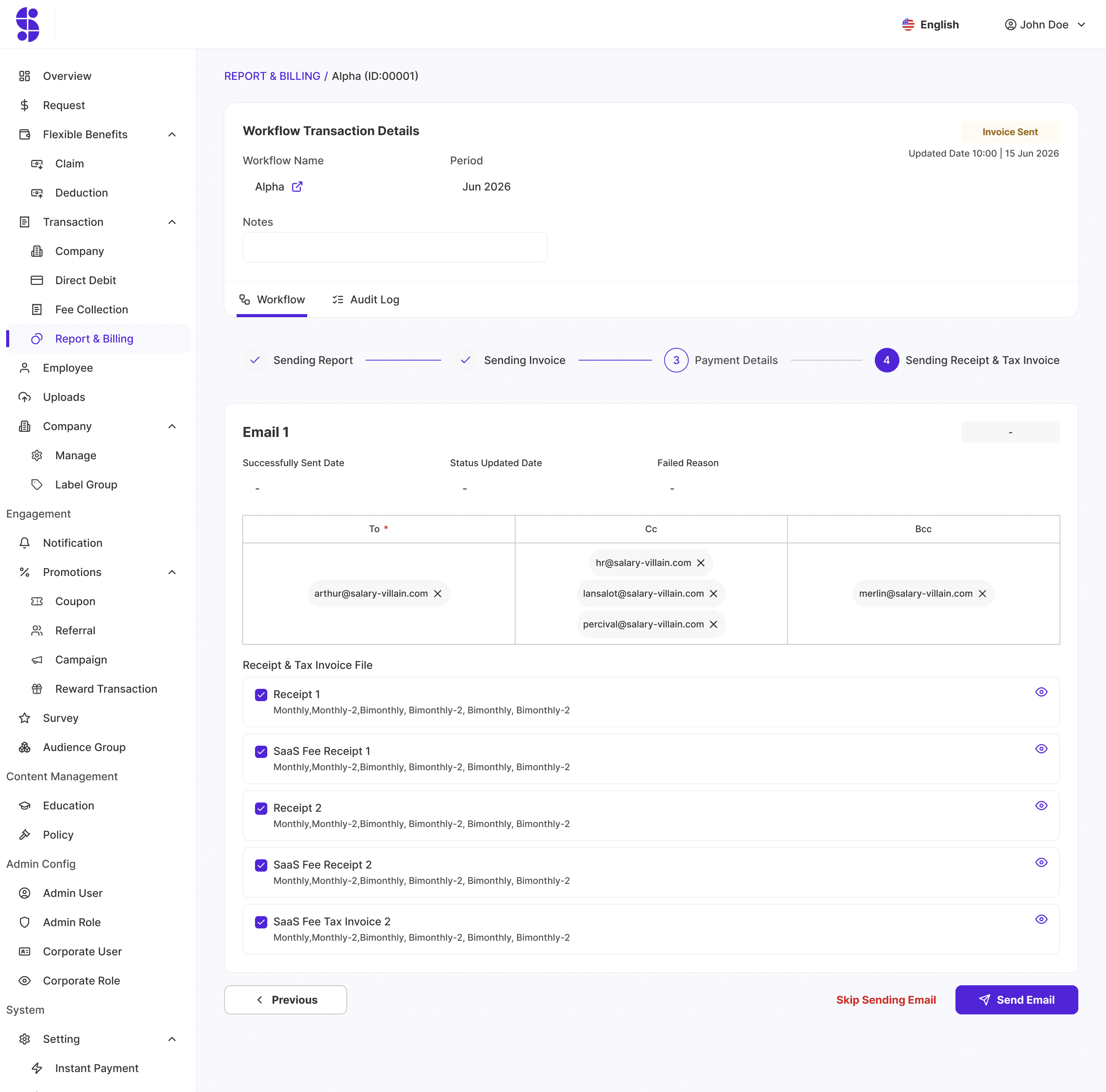
Entry point: Report & Billing → Workflow Transaction tab. Lists transactions (ID, Workflow Name, Period, Status, Report Sending Date, Report Email Sending Status, Invoice Sending Date). Clicking a row opens Workflow Transaction Details with a 4-step tracker: Sending Report → Sending Invoice → Payment Details → Sending Receipt & Tax Invoice, plus a Workflow tab and an Audit Log tab.


Reflections
This project has been on the backlog since I joined Salary Hero — nearly four years ago. It's been paused and restarted multiple times as client requirements kept evolving. The more clients we onboard, the more edge cases we uncover. I'm glad we're finally seeing it through. Looking back, there are two things I'd do differently:
List conditions before designing
We initially assumed that maximum configurability would solve everything for CS and Accounting. In reality, the number of actual edge cases was much smaller than we anticipated. Next time, I'd start by sitting down with both teams, mapping out every condition they encounter, and finding the patterns before jumping into solutions.
Surface technical constraints early
Some client requests turned out to be technically infeasible — for example, threading follow-up emails as replies to the original even when content had changed. We should have looped in developers sooner so we could communicate limitations to CS and Accounting before expectations were set.